PWYW
PWYW (Pay What You Want) is a new template that shows 4 plans that the user can choose one of – similar to how it works on the Webflow pages.
| Key | Notes |
|---|---|
type | pwyw |
stepId | Unique step id |
title | The step title |
subtitle | The step subtitle |
useHTML | This allows you to add inline HTML to the title, subtitle of the step to give it a font-kalam or add a break to it </br> <span class='font-kalam' style='color:#FFA033;'>choose the amount</span> you pay. Here for example, this text will start on a new font and will be in font kalam in the color FFA033. In case like that you must set useHTML to true. |
backgroundColor | |
textColor | The main textColor on the page |
choices | An array for the choices that the user should shows from. "choices": [ { "name": "shape-subs-quarterly-intro-1-thirtynine", "value": "shape-subs-quarterly-intro-1-thirtynine" }, { "name": "shape-subs-quarterly-intro-5-thirtynine", "value": "shape-subs-quarterly-intro-5-thirtynine" }, { "name": "shape-subs-quarterly-intro-10-thirtynine", "value": "shape-subs-quarterly-intro-10-thirtynine" }, { "name": "shape-subs-quarterly-intro-16-thirtynine", "value": "shape-subs-quarterly-intro-16-thirtynine", "mostPopularText": "MOST POPULAR" } ] NOTE: The name of each choice must be the plan codes on the page. mostPopularText here is the text that should be on the most popular choice (see screenshot below) |
choiceBackgroundColor | The background color of the plans |
choiceTextColor | The text color of the plans |
selectedChoiceBorderColor | The selected plan’s border color |
mostPopularChoiceColor | The mostPopularText background’s color. |
mostPopularTextColor | The mostPopularTexttext color. |
ctaText | The text of the main button |
ctaColor | The text color of the main button |
ctaBackgroundColor | The background color of the main button |
ctaHoverBackgroundColor | The background of the main button on hovering. |
backButtonColor | The text color of the back button |
backButtonText | The text of the back button |
backButtonBackgroundColor | The background color of the back button |
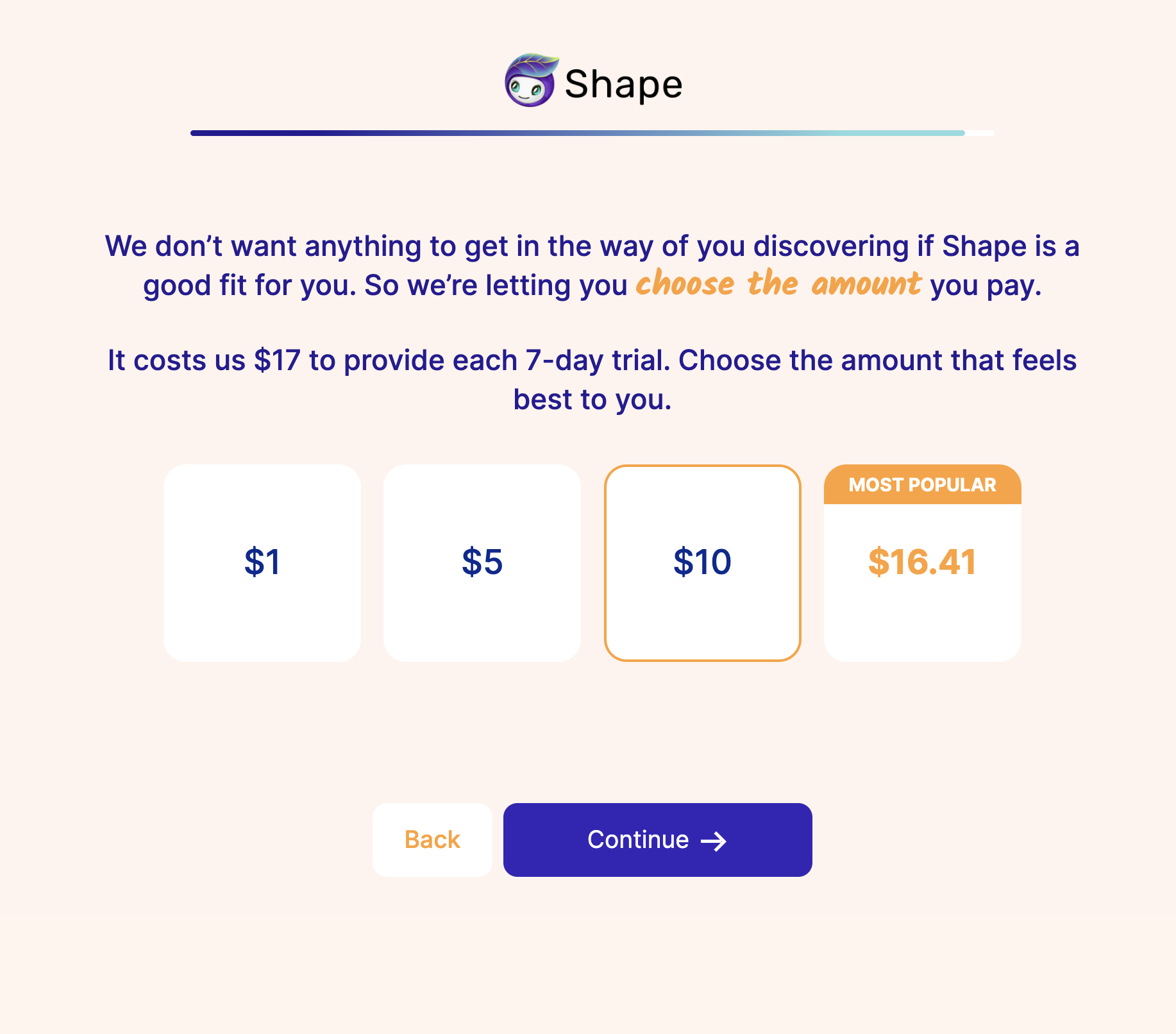
Example:
{
  "type": "pwyw",
  "stepId": "step_54",
  "backgroundColor": "#FFF4EE",
  "textColor": "#251C93",
  "title": "We don’t want anything to get in the way of you discovering if Shape is a good fit for you. So we’re letting you <span class='font-kalam' style='color:#FFA033;'>choose the amount</span> you pay.",
  "subtitle": "It costs us $17 to provide each 7-day trial. Choose the amount that feels best to you.",
  "useHTML": true,
  "ctaText": "Continue",
  "ctaColor": "#FFF",
  "ctaBackgroundColor": "#3425B8",
  "ctaHoverBackgroundColor": "#2A1E93",
  "backButtonColor": "#FFA133",
  "backButtonBackgroundColor": "#FFF",
  "backButtonText": "Back",
  "choiceBackgroundColor": "#FFF",
  "choiceTextColor": "#042A90",
  "selectedChoiceBorderColor": "#FFA133",
  "mostPopularChoiceColor": "#FFA133",
  "mostPopularTextColor": "#FFF",
  "choices": [
      {
          "name": "shape-subs-quarterly-intro-1-thirtynine",
          "value": "shape-subs-quarterly-intro-1-thirtynine"
      },
      {
          "name": "shape-subs-quarterly-intro-5-thirtynine",
          "value": "shape-subs-quarterly-intro-5-thirtynine"
      },
      {
          "name": "shape-subs-quarterly-intro-10-thirtynine",
          "value": "shape-subs-quarterly-intro-10-thirtynine"
      },
      {
          "name": "shape-subs-quarterly-intro-16-thirtynine",
          "value": "shape-subs-quarterly-intro-16-thirtynine",
          "mostPopularText": "MOST POPULAR"
      }
  ]
}